

Clustering Using Embeddings
Colab Notebook
Section titled “Colab Notebook”This chapter uses the same notebook as the previous chapter.
For the setup, please refer to the Setting Up chapter at the beginning of this module.
Clustering
Section titled “Clustering”As the amount of unstructured text data increases, organizations will want to be able to derive an understanding of its contents. One example would be to discover underlying topics in a collection of documents so we can explore trends and insights. Another could be for businesses to segment customers based on preferences and activity.
These kinds of tasks fall under a category called clustering. In machine learning, clustering is a process of grouping similar documents into clusters. It is used to organize a large number of documents into a smaller number of groups. And it lets us discover emerging patterns in a collection of documents without us having to specify much information beyond supplying the data.
And now that we have text represented by their embeddings, putting them through a clustering algorithm becomes simple. Let’s look at an example using the same 9 data points.
Implementation-wise, we use the K-means algorithms to cluster these data points (if you'd like to learn more about it, please check this video about the K-means algorithm).
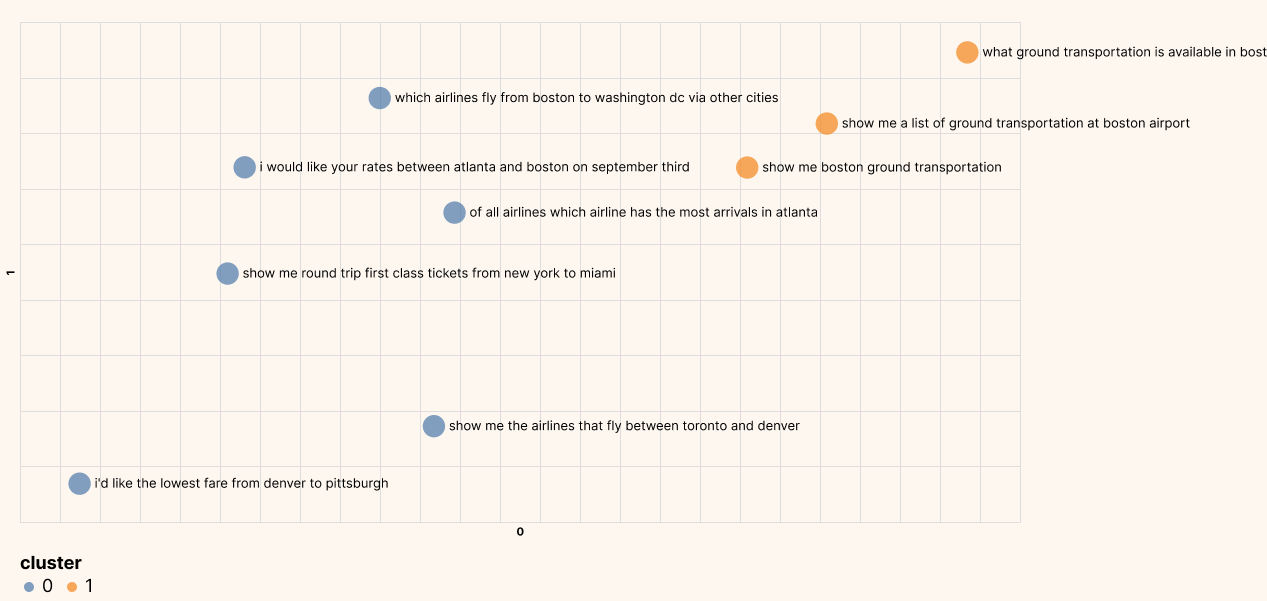
Other than providing the embeddings, the only other key information we need to provide for the algorithm is the number of clusters we want to find. This is normally larger in actual applications, but since our dataset is small, we’ll set the number of clusters to 2.
from sklearn.cluster import KMeans

# Pick the number of clusters
df_clust = df_pc2.copy()
n_clusters = 2

# Cluster the embeddings
kmeans_model = KMeans(n_clusters=n_clusters, random_state=0)
classes = kmeans_model.fit_predict(embeds).tolist()
df_clust["cluster"] = list(map(str, classes))

# Plot on a chart
df_clust.columns = df_clust.columns.astype(str)
generate_chart(
    df_clust.iloc[:sample],
    "0",
    "1",
    lbl="on",
    color="cluster",
    title="Clustering with 2 Clusters",
)
The plot below shows the clusters that the algorithm returned. It looks to be spot on, where we have one cluster related to airline information and one cluster related to ground service information.
Conclusion
Section titled “Conclusion”In this chapter, you learned how to cluster a dataset of sentences, and you observed that each cluster corresponds to a particular topic.
Original Source
Section titled “Original Source”This material comes from the post Text Embeddings Visually Explained