

Introduction to Embeddings at Cohere
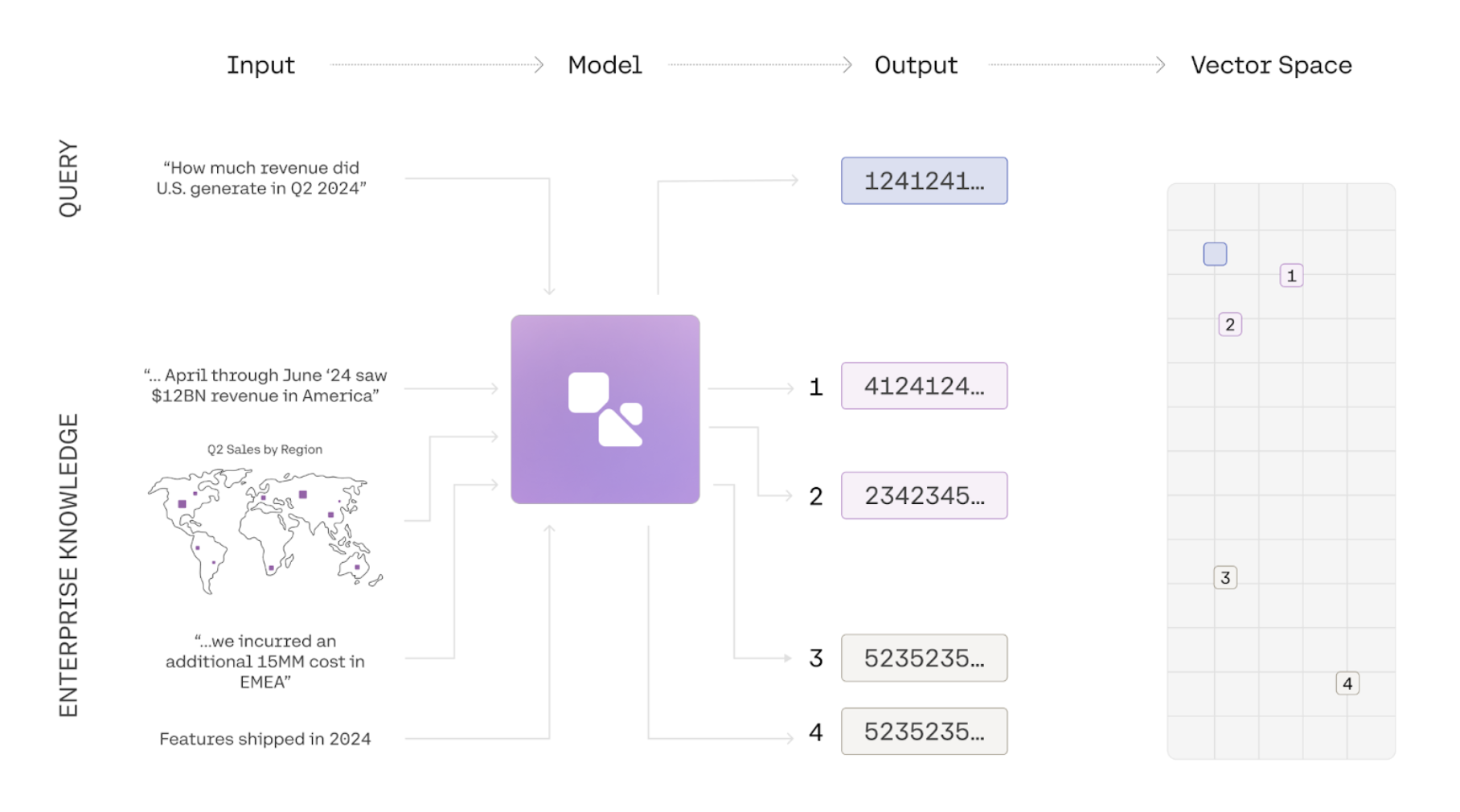
Embeddings are a way to represent the meaning of texts, images, or information as a list of numbers. Using a simple comparison function, we can then calculate a similarity score for two embeddings to figure out whether two pieces of information are about similar things. Common use-cases for embeddings include semantic search, clustering, and classification.
In the example below we use the embed-v4.0 model to generate embeddings for three phrases and compare them using a similarity function. The two similar phrases have a high similarity score, and the embeddings for two unrelated phrases have a low similarity score:
The input_type parameter
Section titled “The input_type parameter”Cohere embeddings are optimized for different types of inputs.
- When using embeddings for semantic search, the search query should be embedded by setting
input_type="search_query" - When using embeddings for semantic search, the text passages that are being searched over should be embedded with
input_type="search_document". - When using embedding for
classificationandclusteringtasks, you can setinput_typeto either 'classification' or 'clustering' to optimize the embeddings appropriately. - When
input_type='image'forembed-v3.0, the expected input to be embedded is an image instead of text. If you useinput_type=imageswithembed-v4.0it will default to search_document. We recommend usingsearch_documentwhen working withembed-v4.0`.
Multilingual Support
Section titled “Multilingual Support”embed-v4.0 is a best-in-class best-in-class multilingual model with support for over 100 languages, including Korean, Japanese, Arabic, Chinese, Spanish, and French.
import cohere

co = cohere.ClientV2(api_key="<YOUR API KEY>")

texts = [
    "Hello from Cohere!",
    "مرحبًا من كوهير!",
    "Hallo von Cohere!",
    "Bonjour de Cohere!",
    "¡Hola desde Cohere!",
    "Olá do Cohere!",
    "Ciao da Cohere!",
    "您好,来自 Cohere!",
    "कोहेरे से नमस्ते!",
]

response = co.embed(
    model=model,
    texts=texts,
    input_type="classification",
    embedding_types=["float"],
)

embeddings = response.embeddings.float  # All text embeddings
print(embeddings[0][:5]) # Print embeddings for the first textcurl --request POST \
--url https://api.cohere.ai/v2/embed \
--header 'accept: application/json' \
--header 'content-type: application/json' \
--header "Authorization: bearer $CO_API_KEY" \
--data '{
"model": "embed-v4.0",
"input_type": "classification",
"embedding_types": ["float"],
"texts": [
"Hello from Cohere!",
"مرحبًا من كوهير!",
"Hallo von Cohere!",
"Bonjour de Cohere!",
"¡Hola desde Cohere!",
"Olá do Cohere!",
"Ciao da Cohere!",
"您好,来自 Cohere!",
"कोहेरे से नमस्ते!"
]
}'Image Embeddings
Section titled “Image Embeddings”The Cohere Embedding platform supports image embeddings for embed-v4.0 and the embed-v3.0 family. There are two ways to access this functionality:
- Pass
imageto theinput_typeparameter. Here are the steps:- Pass image to the
input_typeparameter - Pass your image URL to the images parameter
- Pass image to the
- Pass your image URL to the new
imagesparameter. Here are the steps:- Pass in a input list of
dictswith the key content - content contains a list of
dictswith the keystypeandimage
- Pass in a input list of
When using the images parameter the following restrictions exist:
- Pass
imageto theinput_typeparameter (as discussed above). - Pass your image URL to the new
imagesparameter.
Be aware that image embedding has the following restrictions:
- If
input_type='image', thetextsfield must be empty. - The original image file type must be in a
png,jpeg,webp, orgifformat and can be up to 5 MB in size. - The image must be base64 encoded and sent as a Data URL to the
imagesparameter. - Our API currently does not support batch image embeddings for
embed-v3.0models. Forembed-v4.0, however, you can submit up to 96 images.
When using the inputs parameter the following restrictions exist (note these restrictions apply to embed-v4.0):
- The maximum size of payload is 20mb
- All images larger than 2,458,624 (1568x1568) pixels will be downsampled to 2,458,624 pixels
- All images smaller than 3,136 (56x56) pixels will be upsampled to 3,136 pixels
input_typemust be set to one of the followingsearch_querysearch_documentclassificationclustering
Here's a code sample using the inputs parameter:
import cohere
from PIL import Image
from io import BytesIO
import base64

co = cohere.ClientV2(api_key="YOUR_API_KEY")

# The model accepts input in base64 as a Data URL


def image_to_base64_data_url(image_path):
    # Open the image file
    with Image.open(image_path) as img:
        image_format = img.format.lower()
        buffered = BytesIO()
        img.save(buffered, format=img.format)
        # Encode the image data in base64
        img_base64 = base64.b64encode(buffered.getvalue()).decode(
            "utf-8"
        )

    # Create the Data URL with the inferred image type
    data_url = f"data:image/{image_format};base64,{img_base64}"
    return data_url


base64_url = image_to_base64_data_url("<PATH_TO_IMAGE>")

input = [
    {
        "content": [
            {"type": "image_url", "image_url": {"url": base64_url}}
        ]
    }
]

res = co.embed(
    model="embed-v4.0",
    embedding_types=["float"],
    input_type="search_document",
    inputs=input,
    output_dimension=1024,
)

res.embeddings.float
Here's a code sample using the images parameter:
import cohere
from PIL import Image
from io import BytesIO
import base64

co = cohere.ClientV2(api_key="YOUR_API_KEY")

# The model accepts input in base64 as a Data URL


def image_to_base64_data_url(image_path):
    # Open the image file
    with Image.open(image_path) as img:
        # Create a BytesIO object to hold the image data in memory
        buffered = BytesIO()
        # Save the image as PNG to the BytesIO object
        img.save(buffered, format="PNG")
        # Encode the image data in base64
        img_base64 = base64.b64encode(buffered.getvalue()).decode(
            "utf-8"
        )

    # Create the Data URL and assumes the original image file type was png
    data_url = f"data:image/png;base64,{img_base64}"
    return data_url


processed_image = image_to_base64_data_url("<PATH_TO_IMAGE>")

ret = co.embed(
    images=[processed_image],
    model="embed-v4.0",
    embedding_types=["float"],
    input_type="image",
)

ret.embeddings.float
Matryoshka Embeddings
Section titled “Matryoshka Embeddings”Matryoshka learning creates embeddings with coarse-to-fine representation within a single vector; embed-v4.0 supports multiple output dimensions in the following values: [256,512,1024,1536]. To access this, you specify the parameter output_dimension when creating the embeddings.
texts = ["hello"]

response = co.embed(
    model="embed-v4.0",
    texts=texts,
    output_dimension=1024,
    input_type="classification",
    embedding_types=["float"],
).embeddings

# print out the embeddings
response.float  # returns a vector that is 1024 dimensions
Support for Fused and Mixed Modalities
Section titled “Support for Fused and Mixed Modalities”embed-v4.0 supports text and content-rich images such as figures, slide decks, document screen shots (i.e. screenshots of PDF pages). This eliminates the need for complex text extraction or ETL pipelines. Unlike our previous embed-v3.0 model family, embed-v4.0 is capable of processing both images and texts together; the inputs can either be an image that contains both text and visual content, or text and images that youd like to compress into a single vector representation.
Here's a code sample illustrating how embed-v4.0 could be used to work with fused images and texts like the following:

import cohere
import base64

# Embed an Images and Texts separately
with open("./content/finn.jpeg", "rb") as image_file:
    encoded_string = base64.b64encode(image_file.read()).decode(
        "utf-8"
    )

# Step 3: Format as data URL
data_url = f"data:image/jpeg;base64,{encoded_string}"

example_doc = [
    {"type": "text", "text": "This is a Scottish Fold Cat"},
    {"type": "image_url", "image_url": {"url": data_url}},
]  # This is where we're fusing text and images.

res = co.embed(
    model="embed-v4.0",
    inputs=[{"content": example_doc}],
    input_type="search_document",
    embedding_types=["float"],
    output_dimension=1024,
).embeddings.float_

# This will return a list of length 1 with the texts and image in a combined embedding

res
Compression Levels
Section titled “Compression Levels”The Cohere embeddings platform supports compression. The Embed API features an embeddings_types parameter which allows the user to specify various ways of compressing the output.
In the v2 API, this is a required parameter for calling the Embed endpoint.
The following embedding types are supported:
floatint8unint8binaryubinary
We recommend being explicit about the embedding type(s). To specify an embedding types, pass one of the types from the list above in as list containing a string:
ret = co.embed(
    texts=["hello_world"],
    model="embed-v4.0",
    input_type="search_document",
    embedding_types=["int8"],
)
You can specify multiple embedding types in a single call. For example, the following call will return both int8 and float embeddings:
ret = co.embed(
    texts=phrases,
    model=model,
    input_type=input_type,
    embedding_types=["int8", "float"],
)

ret.embeddings.int8  # This contains your int8 embeddings
ret.embeddings.float  # This contains your float embeddings
A Note on Bits and Bytes
Section titled “A Note on Bits and Bytes”When doing binary compression, there's a subtlety worth pointing out: because Cohere packages bits as bytes under the hood, the actual length of the vector changes. This means that if you have a vector of 1024 binary embeddings, it will become 1024/8 => 128 bytes, and this might be confusing if you run len(embeddings). This code shows how to unpack it so it works if you're using a vector database that does not take bytes for binary:
res = co.embed(
    model="embed-v4.0",
    texts=["hello"],
    input_type="search_document",
    embedding_types=["ubinary"],
    output_dimension=1024,
)
print(
    f"Embed v4 Binary at 1024 dimensions results in length {len(res.embeddings.ubinary[0])}"
)

query_emb_bin = np.asarray(res.embeddings.ubinary[0], dtype="uint8")
query_emb_unpacked = np.unpackbits(query_emb_bin, axis=-1).astype(
    "int"
)
query_emb_unpacked = 2 * query_emb_unpacked - 1
print(
    f"Embed v4 Binary at 1024 unpacked will have dimensions:{len(query_emb_unpacked)}"
)