

Sending Feedback
The Feedback API allows users to provide feedback on responses generated by the Chat API or Generate API to improve models. The endpoint accepts preference and performance feedback, and this guide provides instructions on how to use it.
The Feedback API allows users to provide feedback on responses created from the Chat API.
The endpoint accepts preference and performance feedback, which we use to improve our models. This guide provides a starting point for using the Feedback endpoint.
You can see a live example of the Feedback API in action on our playground. In the image below, we've asked the model to generate titles for a blog post on quantum computing. If you look in the bottom right (where the red arrow is pointing), you'll see you can give a "thumbs up" or a "thumbs down" to provide feedback on the quality of the model's output. The other "stack of papers" icon let's you easily copy the output.
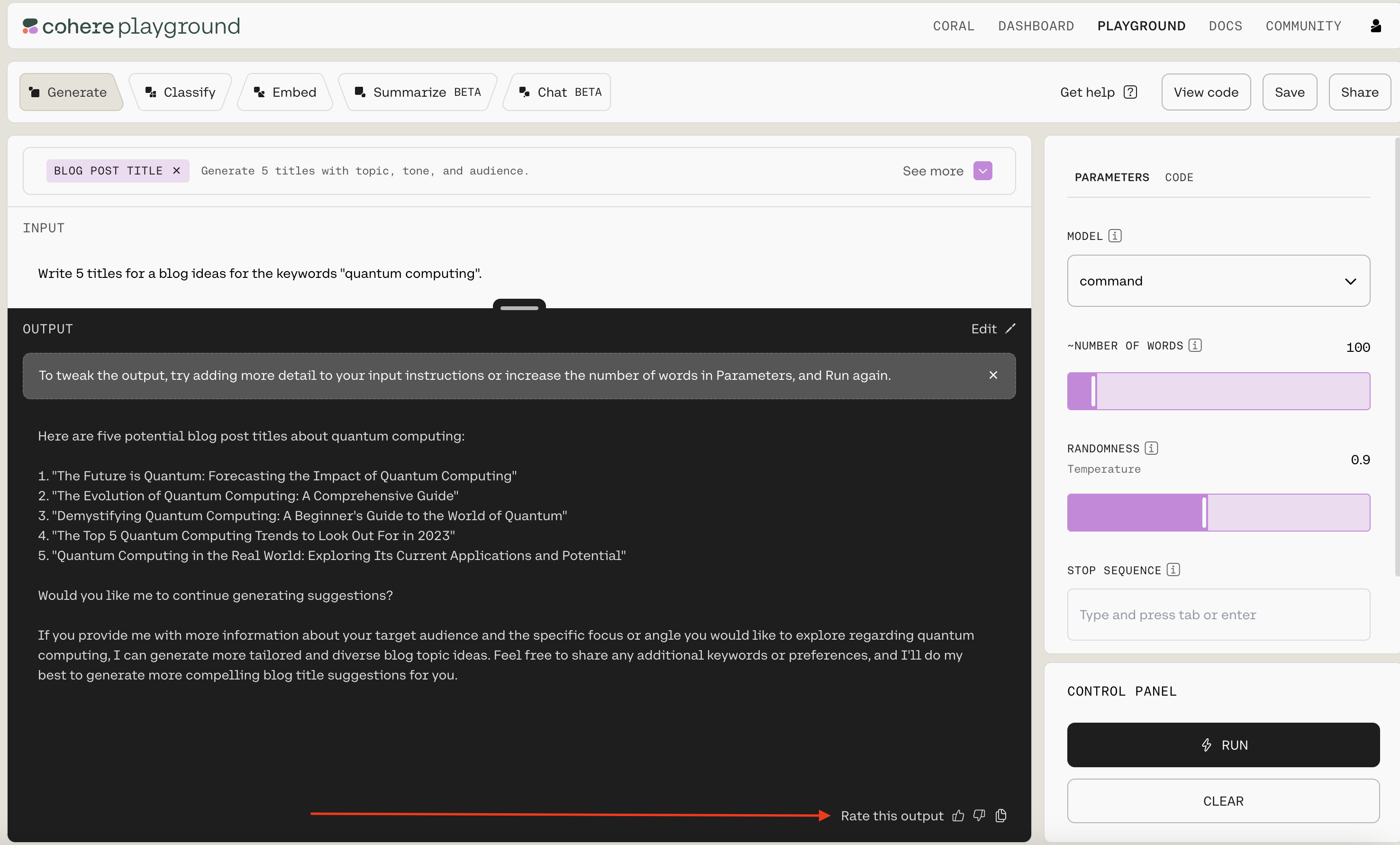
Or, you can read below to learn how to call the feedback endpoint with our API.
Generate Feedback
Section titled “Generate Feedback”You can produce detailed feedback based on the annotator's acceptance of the generated response using the generate_feedback endpoint.
Parameters
Section titled “Parameters”The endpoint has a number of settings you can use to control the kind of output it generates:
request_id(String, required): The request_id of the generation request to give feedback on.good_response(Boolean, required): Whether the response was good or not.model(String): The unique ID of the model.desired_response(String): The desired response. Used when an annotator edits a suggested response.flagged_response(Boolean): Whether the response was flagged or not.flagged_reason(String): The reason the response was flagged.prompt(String): The original prompt used to generate the response.annotator_id(String): The annotator's ID.
Example Requests
Section titled “Example Requests”If the annotator accepts the suggested response, you could format a request like this:
generations = co.generate(
    prompt=f"Write me a polite email responding to the one below: {email}. Response:"
)
if user_accepted_suggestion:
    co.generate_feedback(
        request_id=generations[0].id, good_response=True
    )
If the annotator edits the suggested response, you could format a request like this:
generations = co.generate(
    prompt=f"Write me a polite email responding to the one below: {email}. Response:"
)
if user_edits_suggestion:
    co.generate_feedback(
        request_id=generations[0].id,
        good_response=False,
        desired_response=user_edited_suggestion,
    )
Example Response
Section titled “Example Response”Generate Preference Feedback
Section titled “Generate Preference Feedback”Alternatively, you can generate feedback based on which response an annotator prefers with the generate_preference_feedback endpoint.
Parameters
Section titled “Parameters”ratings(List[PreferenceRating], required): A list of PreferenceRating objects.model(String): The unique ID of the model.prompt(String): The original prompt used to generate the response.annotator_id(String): The annotator's ID.
Example Request
Section titled “Example Request”A user accepts a model's suggestion in an assisted writing setting, and prefers it to a second suggestion. Here's what a request might look like:
generations = co.generate(
    prompt=f"Write me a polite email responding to the one below: {email}. Response:",
    num_generations=2,
)
if user_accepted_idx:  # prompt user for which generation they prefer
    ratings = []
    if user_accepted_idx == 0:
        ratings.append(PreferenceRating(request_id=0, rating=1))
        ratings.append(PreferenceRating(request_id=1, rating=0))
    else:
        ratings.append(PreferenceRating(request_id=0, rating=0))
        ratings.append(PreferenceRating(request_id=1, rating=1))
    co.generate_preference_feedback(ratings=ratings)