

Fine-tuning Cohere Models on Amazon SageMaker
In this section, you'll find information on how to fine-tune Cohere's generative models on AWS Sagemaker.
Sagemaker customers can fine-tune Cohere’s Command R model for their use cases.
Customers can kick off fine-tuning jobs by completing the data preparation and validation steps through the AWS Console. This is useful for customers who don't need or don't want to create a fine-tuning job programmatically via the Cohere AWS SDK, preferring to opt for the ease and simplicity of a web interface instead.
Please see our jupyter notebook for step by step instructions.
Preparing your data
Section titled “Preparing your data”Before a fine-tuning job can be started, users must upload a dataset with training and (optionally) evaluation data. The structure of the data for fine-tuning on Amazon Sagemaker should be jsonl. Read more about preparing the training data for chat fine-tuning in our docs: Preparing the Chat Fine-tuning Data.
Data format
Section titled “Data format”You'll need your input data to be in jsonl file, in our chat format. Please see Preparing the Chat Fine-tuning Data for more details.
{
  "messages": [
    {
      "role": "System",
      "content": "You are a large language model trained by Cohere."
    },
    {
      "role": "User",
      "content": "Hi! What were Time magazines top 10 cover stories in the last 10 years?"
    },
    {
      "role": "Chatbot",
      "content": "Time magazines top 10 cover stories in the last 10 years were:\\n\\n1. Volodymyr Zelenskyy\\n2. Elon Musk\\n3. Martin Luther King Jr.\\n4. How Earth Survived\\n5. Her Lasting Impact\\n6. Nothing to See Here\\n7. Meltdown\\n8. Deal With It\\n9. The Top of America\\n10. Bitter Pill"
    },
    {
      "role": "User",
      "content": "Who is Volodymyr Zelenskyy?"
    },
    {
      "role": "Chatbot",
      "content": "Volodymyr Zelenskyy is a Ukrainian politician who was elected President of Ukraine in 2019. He previously served as the Minister of Internal Affairs in the government of Prime Minister Volodymyr Groysman."
    },
    {
      "role": "User",
      "content": "Thank you!"
    }
  ]
}
Starting the Chat Fine-tuning
Section titled “Starting the Chat Fine-tuning”After uploading the dataset, the fine-tuning job can begin.
The Sagemaker fine-tuning job requires:
- an s3 path to the uploaded train dataset
- an optional s3 path to the eval dataset
In this section, we will walk through how you can start training a fine-tuned model for Generate with both the AWS Console and the Cohere AWS SDK.
AWS Console
Section titled “AWS Console”Creating a fine-tuned model for Generate via the AWS Console consists of a few simple steps, discussed below.
Choose a Custom Model
Section titled “Choose a Custom Model”Input your data
Section titled “Input your data”In the Input your data section, you can provide the S3 link to the training dataset file and, optionally, the validation dataset file. Your data should be in jsonl format. You can also set the following hyperparameters to use in training.
Set Your Hyperparameters
Section titled “Set Your Hyperparameters”We allow you to specify the following hyperparameters for Command-R.
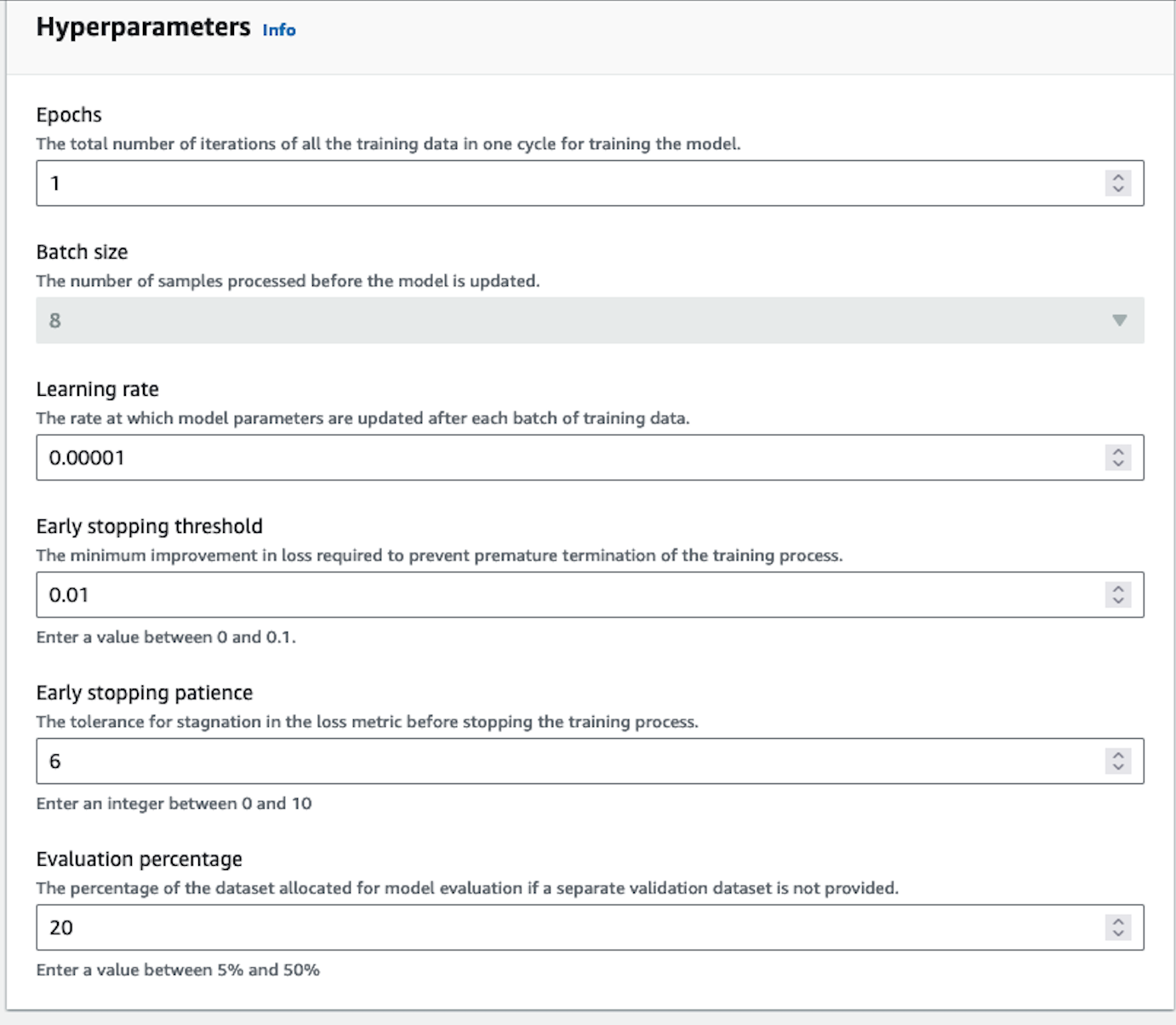
We suggest starting your training without setting any specific parameters. That said, here are some guidelines for resolving certain issues you might encounter:
- If the model outputs are too similar or lack diversity, reduce the epoch number by 1 or 2.
- If the model does not appear to be converging, increase the learning rate.
- If you want to change your batch size, you can use 8, 16 or 24 for Command Light. Command has a batch size of 8.
Output your data
Section titled “Output your data”In the Output data section, enter the Amazon S3 location in which Amazon Sagemaker should save the output of the job. Amazon Sagemaker stores the training loss metrics and validation loss metrics for each epoch in separate files in the location that you specify.
Start Training
Section titled “Start Training”Choose 'Create Fine-tuning job' to begin the job.
You will be able to see your training job overview as illustrated below.
You will receive an email notification when the fine-tuning job has completed training. You can explore the evaluation metrics using the AWS Console. Learn more here.
Fine-tuning Job Statuses
Section titled “Fine-tuning Job Statuses”As your fine-tuning job runs, it will progress through various stages. The following table describes the meaning of the various status messages you might encounter. You can also stop your fine-tuning job while it is in progress.
| Status | Meaning |
|---|---|
| In Progress | The fine-tuning job is in progress |
| Stopping | The fine-tuning job is in the process of stopping. |
| Stopped | The fine-tuning job is currently stopped. |
| Completed | The fine-tuning job has finished and is ready to be called. |
| Failed | The fine-tuning job has failed. Please contact customer support if you need more help in understanding why the job has failed. |
Calling the Fine-tuned Model
Section titled “Calling the Fine-tuned Model”Cohere's AWS SDK
Section titled “Cohere's AWS SDK”In addition to the Sagemaker UI, customers are also able to create programatic fine-tuning job using the Cohere AWS SDK. The SDK exposes methods to create fine-tuning jobs, monitor progress, and invoke the fine-tuned model. Please see the following ipython notebooks:
Start a fine-tuning job
Section titled “Start a fine-tuning job”Please see the notebooks above for full import paths, arns, and explanations.